Audio Separation with KaraFan
KaraFan is a powerful, free tool for separating audio sources. It can extract vocals from a song, remove instruments, and more. This makes it an excellent tool for creating clean datasets for voice model training.
For more information, you can visit the official KaraFan GitHub repository.
Installation
Section titled “Installation”You can run KaraFan on your local computer or on Google Colab.
- Create a folder on your PC where you want to store the KaraFan project.
- Download and install Python 3.11. If you have another version of Python installed, you must uninstall it first.
- Download the KaraFan installer (right-click and save as
Install.bat). - On Windows 11, you may need to unblock the
.batfile. Right-click the file, go to Properties, and click the Unlock button in the General tab. - Run the
Install.batfile with administrator rights. - Once the installation is complete, run
Setup.pyby double-clicking on it. - You can now launch KaraFan by double-clicking on
KaraFan.pyw.
- Open the KaraFan Colab Notebook.
- In your Google Drive, create a folder named
Musicfor your input audio files and a folder namedVocalsfor the output files. - Run the first cell in the notebook to clone the KaraFan repository.
- Run the second cell, labeled “This is it!”, to launch the KaraFan interface.
How to Use KaraFan
Section titled “How to Use KaraFan”- Place the audio file you want to process in the
Musicfolder (either locally or in your Google Drive). - In the KaraFan interface, enter the path to your audio file and the path to your output folder.
- Choose the desired settings. The recommended settings for separating vocals are shown below.
- Click the Start button to begin the separation process.
- When the process is complete, you’ll find the separated audio files in your output folder. The main vocal track is usually named
Vocal Final.
| To separate vocals | To separate other audio sources |
|---|---|
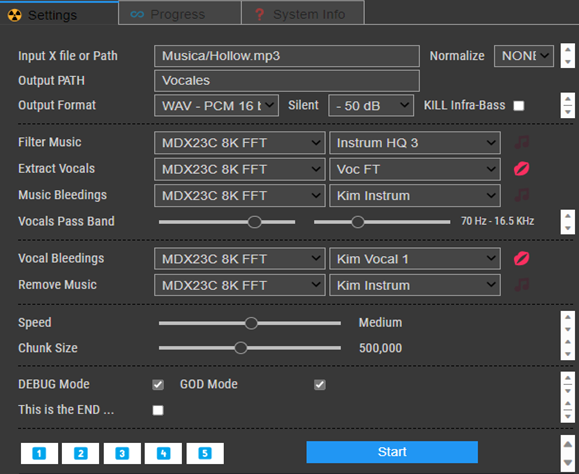 | 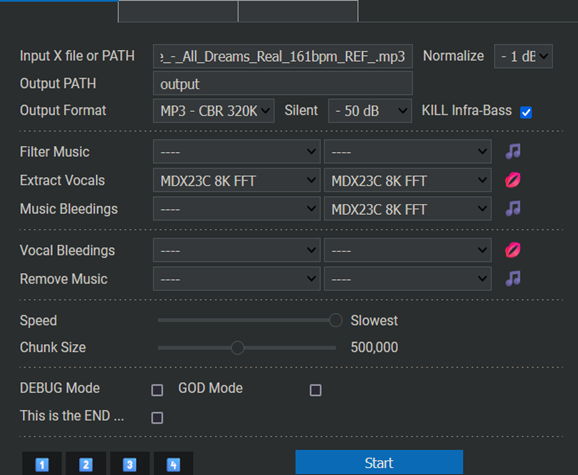 |
How to Update
Section titled “How to Update”To update your local installation of KaraFan, simply run the Setup.py file again.