Using Plugins
Plugins are extensions that add new features and functionality to Applio without needing to update the entire application. They can provide new tools, new tabs in the interface, or new options for audio processing.
Installing Plugins
Section titled “Installing Plugins”You can install plugins in two ways: through the Applio interface or manually.
Method 1: Use the Plugin Installer
Section titled “Method 1: Use the Plugin Installer”This is the easiest and recommended way to install plugins.
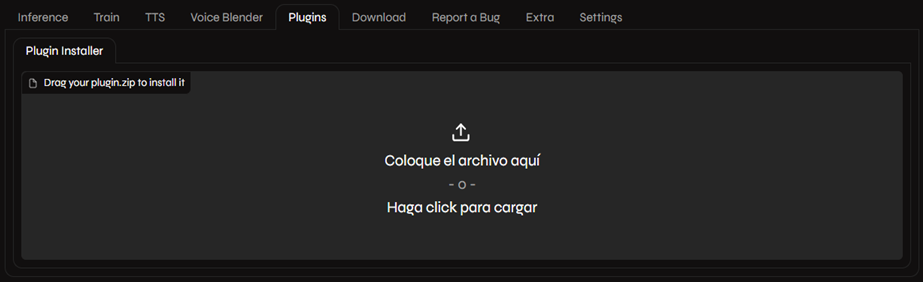
- Download the plugin you want to install. Plugins are usually distributed as
.zipfiles. - In the Applio interface, go to the Plugins tab.
- Drag and drop the plugin’s
.zipfile into the Plugin Installer box. - Refresh the Applio interface. The new plugin’s features should now be available.
Method 2: Manual Installation
Section titled “Method 2: Manual Installation”If you prefer, you can also install plugins manually.
- Download and extract the plugin’s
.zipfile. - Move the extracted folder to the
Applio/tabs/Plugins/installeddirectory in your Applio installation. - Restart Applio.
Finding Plugins
Section titled “Finding Plugins”You can find a collection of official and community-made plugins on the Applio Plugins GitHub repository.
Updating Plugins
Section titled “Updating Plugins”To update a plugin, simply follow the same installation steps with the new version of the plugin. It will overwrite the old version.